
Shadow IT. Sounds scary, right? But what if the really scary thing was the root cause behind people using unauthorized devices, apps, or software: slow approval workflows?
Shadow IT is what happens when company processes move slower than the actual pace of work. Employees aren't trying to break the rules; they're only trying to hit a deadline, close a deal, or share a file that's too big for an approved tool. But even if these decisions are unintentional, they can cause huge risks to organizations.
In this article, we'll look at why shadow IT happens, and why it's become such a big problem lately. We’ll provide a practical, three-step approach to fixing it for good, and explore where the right Data Loss Prevention (DLP) tool fits in.
What is shadow IT, and why is it such a liability?
Shadow IT is any technology, including apps, software, devices, AI tools, and cloud services, that employees use for work without the knowledge or approval of the IT department. And lately, shadow IT has been booming: Gartner predicts 75% of employees will be acquiring or modifying technology outside official IT visibility by 2027.
When IT is unaware of the shadow IT being used, it can’t monitor what information is being shared, or what privileges are being granted to apps and tools. This makes the use of Shadow IT particularly susceptible to exploitation by hackers.
In most cases, shadow IT isn’t used maliciously – people are simply looking for ways to do their jobs better and faster. But often these decisions prioritize speed over safety, creating unintended risks that can threaten the whole organization.
Consider this scenario: you need to share a 400MB video file with a client, but your company's approved file-sharing cap is at 25MB. The client is making a decision tomorrow, and IT takes at least two weeks to reply, making it easier to just use WeTransfer instead of waiting on an official approval. Just like that, shadow IT has crept into your workflow.
Shadow IT doesn't only come from employees ignoring policy. It comes from policies and systems that are too rigid, too slow, or too out of step with how people actually work. And these shortcomings are causing serious harm: studies show around 11% of all cyber incidents happen thanks to shadow IT.
Speaking of how people actually work, have you read our practical cybersecurity checklist yet? Get it for free right here.
Real-life Shadow IT stories: what went wrong
Before we get into why shadow IT is booming, let’s take a look at a few familiar shadow IT examples – and the real-world incidents that caused such a big headache for companies.
The Personal Laptop
Scenario: A member of your team needs to work remotely for a few days, but they’ve left their work computer in the office, so they use their personal laptop.
IRL example: Nikkei leaked sensitive data for 17,000 customers in 2025 after an employee logged in to Slack from their personal computer, which was infected with malware.
The WhatsApp War Room
Scenario: An operations team decides coordinating over personal phones is much easier because the official comms tool requires three separate approvals just to add a contact, and they can’t be bothered.
IRL example: Over a dozen major banks were fined over $2 billion in 2022, in part because employees conducted business on WhatsApp and other unauthorized messaging platforms that firms and regulators couldn't keep tabs on.
The Rogue Trello Board
Scenario: A project is managed on a free-tier Trello account because the enterprise project management tool takes weeks to grant access, and budgets are tight.
IRL example: In 2016, a UN board leaked credentials for an internal file server through misconfigured, publicly visible Trello boards that nobody in security was tracking.
The Shadow AI Stack
Scenario: Several employees are running sensitive data through public versions of ChatGPT, Claude, or Gemini because there's no approved internal AI tool in place.
IRL example: Samsung famously banned ChatGPT in 2023 after employees pasted sensitive source code into an open version of the tool, adding this code to its training dataset.
The Smartwatch Loophole
Scenario: A government agency has a strict policy on using official devices with WiFi or bluetooth capabilities in secure office environments in which highly sensitive material is handled, but allows employees to wear unsecured smartwatches.
IRL example: In 2025, researchers demonstrated the possibility of stealing data in secure air-gapped environments via hacking smartwatches.
Each of these examples follows the same pattern: a genuine business need is met by the fastest available tool, with no security team in the loop, and this creates the risk of unintentional data breaches, exfiltration, and other attacks.
Let’s dig deeper on why more people have been using unauthorized tools lately.
Why shadow IT is exploding (hint: it's not just remote work)
The growth of shadow IT over the last decade comes down to a few consistent factors:
- The approval process is broken. Employees often wait weeks for IT to approve tools that take thirty seconds to sign up for themselves.
- There’s a gap in awareness. People may not understand that there are rules in place around which devices, software, or apps should be used for work. Similarly, they may not realize how these tools can be used against them – and their workplace.
- Consumer tech has lapped enterprise tech on user experience. The free version of a tool is often far better designed, and easier to use, than whatever IT provides.
- Business moves faster than official processes. If a busy lead insists on chatting over WhatsApp to get things moving when a day’s delay could cost the opportunity, of course a sales rep is going to take a call on the unsecured platform.
- The AI wildcard. Shadow AI is accelerating everything, with ChatGPT, Copilot plugins, and browser extensions used across departments IT has never heard of, and often with sensitive data flowing straight into them.
Read more: Smishing Explained: The Threat Vector CISOs Can No Longer Ignore
Shadow IT risks: why this is more than an IT housekeeping issue
So what are the shadow IT risks, in practical terms?
- Security exposure: Unsanctioned tools don’t go through security vetting. There's no enforced MFA, no patch management, and no visibility for the security team, which can expose organizations to the threat of data breaches, malware, and more.
- Compliance landmines: Regulations like GDPR, HIPAA, and PCI-DSS are routinely violated by shadow IT tools that mishandle data residency or handling requirements, often without anyone realizing it until it's too late.
- The invisible attack surface: You can't protect what you can't see. Security teams working from an incomplete asset inventory are, in effect, flying blind – especially when it comes to unsanctioned file sharing via tools that aren’t even on the IT radar.
- Data silos and lost institutional knowledge: When the employee who built that rogue Airtable base leaves the company, the data and the knowledge of how it was structured leaves with them.
- New channels for social engineering: If employees are using a platform, chances are cyber attackers are using it too. And because there’s no visibility for security teams, social engineering is more likely to succeed.
Unfortunately, these risks are more widespread than you might realize: according to Zylo, an astonishing 84% of apps used within enterprise-level companies are not managed by a centralized IT or security team. That figure alone should reframe how most leadership teams think about their actual exposure.
Shadow AI — the biggest threat of all?
Shadow AI, when employees use public versions of generative AI tools such as ChatGPT, Claude, Gemini, Perplexity, and AI browser plugins without IT or security approval, is arguably the fastest-evolving and least understood category of shadow IT risk.
The risk here is serious. The output of these tools can contain company IP and sensitive data that end up feeding training models or sitting on third-party servers indefinitely. Here’s a common pattern: a developer pastes proprietary source code into an AI assistant to help debug it. That code is now potentially stored in a third-party system and could be reproduced in part elsewhere.
Simply banning AI tools doesn't work, as this only pushes usage further underground, where it's harder to detect and govern. The real opportunity lies with organizations that get ahead of this by using approved AI tooling: they get the productivity upside and the security controls, rather than choosing between the two.
Read more: Cyber Month Spotlight: 5 AI Threats and How to Beat Them
See it, simplify it, solve it: 3 key steps to actually fixing shadow IT for good
Shadow IT can feel like an unsolvable problem, but it isn't. Here's our practical, three-step approach to defining shadow IT and fixing it for good.
Step 1: See it — get some visibility
You can't fix what you can't see, so the first job is shadow IT detection: mapping out the actual scale and scope of the problem inside your organization.
- Deploy a Cloud Access Security Broker (CASB) to discover what's genuinely running across your network.
- Audit OAuth permissions. Most security teams are genuinely shocked by what employees have authorized over time, including overscoped permissions, or access grants from long-abandoned pilot tools.
- Check expense reports. Employees expensing SaaS subscriptions is one of the clearest signs of shadow IT available, and it's often sitting in plain sight in your finance system already.
- Use a good Data Loss Prevention (DLP) tool to track and map file-sharing practices, including those that could extend beyond your official data use policy.
Step 2: Simplify it — fix the process and the policy
Once you understand the scale of the problem, the next step is shadow IT management: addressing the process gaps that created the need for unapproved tools in the first place.
- Create a "fast track" approval lane for low-risk tools, with a target turnaround of 48 hours rather than weeks.
- Run a "shadow IT amnesty." Invite employees to come forward about what they're actually using, without penalty or negative repercussions.
- Talk to employees directly about why they're using these tools. This almost always points to a gap in your approved stack or a friction point in your approval process.
- Revisit your Acceptable Use policy and assess where it still holds up, where it might need adjusting, and how you can make sure your teams understand it.
Step 3: Solve it — build a culture where IT is a partner, not a gatekeeper
Now, this is where the long-term shadow IT policy work really pays off: building a collaborative culture where IT doesn’t get in the way, but actually enables people.
- First, find the right security awareness training to help frame shadow IT as a shared risk rather than purely a rules violation.
- Give people approved alternatives that are actually good. If your file-sharing tool still caps uploads at 25MB in 2026, that's on IT to fix, not on employees to work around.
- Select an approved AI environment with a secure private version – before employees build one for themselves.
- Combine all of this with an Employee Security Posture Management tool that helps you proactively track risky behaviors around device permissions and data sharing.
And remember, your goal isn't zero shadow IT; that's not realistic. The goal is zero unknown shadow IT – and with these steps, you can get there.
None of this works, though, if you can’t see the data leaving in the first place – and that’s where DLP comes in.
Choose a DLP tool that sees the shadow IT risk before it happens
A good DLP tool flags sensitive data heading to unsanctioned apps (personal email, unauthorized cloud storage, unsanctioned destinations), turning shadow IT from an invisible problem into one you can act on. With SaaS sprawl accelerating across every department, cloud DLP isn’t a nice-to-have; it’s a baseline shadow IT control.
But DLP catches the symptom, not the cause, and it only works on data it can see. Some DLP tools can struggle with unmanaged devices, encrypted traffic, and shadow SaaS/shadow AI tools where data is typed into a prompt, rather than sent as a file.
That's why your choice of DLP tool is so important. You need SaaS DLP that covers the platforms your organization actually relies on, including DLP for Google Drive and DLP for Microsoft, since that's where most collaboration and most accidental data transfer happen.
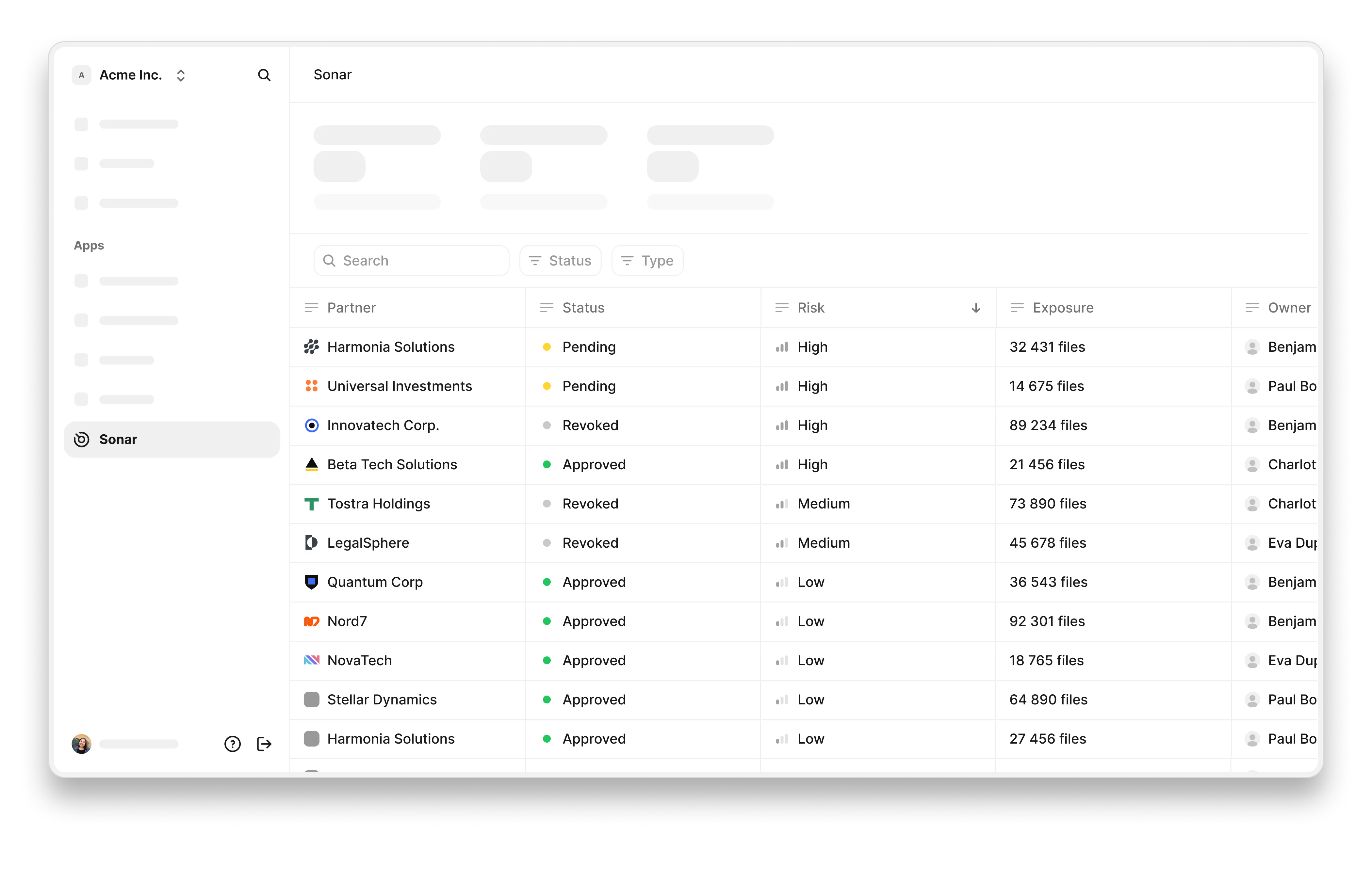
At Riot, we understand these needs, because we’ve been there ourselves. That’s why we built Sonar: to help teams manage how they share data with partners and across cloud platforms, and to catch exposure before it becomes an incident.
Now, before we finish up, let’s look quickly at what you should include in your acceptable use policy.
Shadow IT essentials: what should you include in your acceptable use policy?
A strong shadow IT, acceptable use, or information security policy should cover:
- A clear definition of what requires approval, and what doesn't.
- A fast-track request process.
- A clear split between employee and IT responsibilities.
- Consequences for non-compliance, but include amnesty provisions.
- Specific guidance on AI tools and personal devices.
- Guidance for regular security reviews – ideally quarterly, not annually.
Get your internal policy right, and you can give your teams the clarity they need to understand the true risks of shadow IT and unapproved devices.
The real key to solving shadow IT? Be a coach, not a cop
One last reminder to finish up: The strictest IT department has the most shadow IT.
This isn’t to say we shouldn’t try to monitor shadow IT at all. But instead of policing our teams, we need to coach them to do better. Shadow IT will never disappear entirely, and honestly, you shouldn't want that. Employees resourceful enough to find their own solutions to real problems are employees worth keeping – but they need some guardrails.
The organizations that make shadow IT a lot less scary are the ones that make the approved path so fast and so easy that going rogue simply isn't necessary anymore. But to do this, you need to drive awareness of the risks and invest in a good set of tools for the job.
To boost your team's awareness of shadow IT risks and limit your exposure with our DLP solution Sonar, chat to one of our experts today.
FAQ
- What is shadow IT? Shadow IT is any technology (apps, software, devices, AI tools, or cloud services) that employees use for work without the knowledge or approval of the IT department.
- Why is shadow IT so risky? It creates security exposure, compliance gaps, and an attack surface that security teams can't see or manage, since unsanctioned tools bypass standard vetting and controls.
- How can attackers use shadow IT against us? Attackers target the same unofficial channels and apps employees are already using, knowing these tools sit outside the visibility of security teams.
- How do we manage the risks involved with shadow IT? Start with visibility (discovery and auditing), simplify your approval process and policy, and build a culture where IT processes aren’t a barrier.
- What about shadow AI? Shadow AI is currently the fastest-growing and riskiest category of shadow IT, since sensitive data and IP can be typed directly into prompts with no oversight.
- How can DLP help? A Data Loss Prevention (DLP) tool gives you visibility into where sensitive data is moving, helping you turn shadow IT from an invisible problem into one you can actually act on.